This article puts
the article on agent identity
into practice: we are going to see how to set it up for real. The examples use my domain
name, kaizensphere.dev, to be replaced with yours.
Prerequisite: the identity
In the article on the concept of verifiable identity,
we said that the first step is to give our agent an identity, the agent’s DID
(Decentralized Identifier). Here, to create the agent’s identity, we will first need to
create our own identity (the principal), did:web:kaizensphere.dev, which points to
https://kaizensphere.dev/.well-known/did.json,
and only then will we be able to create the agent’s identity, which will be stored in
its credential manager (I am dropping the term wallet for credential manager, the
W3C’s term).
| Role | Identifier | Where the private key lives |
|---|---|---|
| Principal | did:web:kaizensphere.dev | on your machine |
| Agent | did:web:kaizensphere.dev:agents:redaction | in the agent’s credential manager |
Both DID documents have to be hosted somewhere, over HTTPS and at the exact path of the identifier. I am going to host mine on Codeberg Pages, because my bare domain cannot point to the hosting that serves this blog; the host is up to you. You also need a domain name whose DNS zone you manage, Docker with Compose and a claude.ai account.
Generate the principal’s key
We are going to generate an Ed25519 key pair in a dedicated folder; we will put it in
~/.config/did/.
We chose the Ed25519 type because it is the key the KYA-OS specification settled on. That said, it has plenty of advantages of its own, as it is a simple algorithm to deploy: it gives deterministic signatures, it is supported by almost all developer tooling (OpenSSH, OpenSSL, the JOSE libraries…) and, finally, it is fast and small, which matters because each of our requests will be signed with this key.
Create the folder:
mkdir -p ~/.config/did
Restrict the folder to your user alone:
chmod 700 ~/.config/did
Generate the key pair, stored in a PEM file:
openssl genpkey -algorithm ed25519 -out ~/.config/did/key.pem
Make the file readable by you alone:
chmod 600 ~/.config/did/key.pem
The private key stays on your machine. Remember to back it up.
Encode the public key
For the encoding, we will go with the Multikey format. Why Multikey? Because the whole
key fits in a single string. The same format is found in did:key identifiers and in
the W3C’s Data Integrity proofs. The agent’s document, for its part, will use the
other format you know well, JWK, because the KYA-OS specification requires it for
agents.
This command computes it from the private key:
CLE_PUBLIQUE=$(openssl pkey -in ~/.config/did/key.pem -pubout -outform DER | tail -c 32 | python3 -c '
import sys
octets = bytes([0xed, 0x01]) + sys.stdin.buffer.read()
alphabet = "123456789ABCDEFGHJKLMNPQRSTUVWXYZabcdefghijkmnopqrstuvwxyz"
n = int.from_bytes(octets, "big"); texte = ""
while n: n, r = divmod(n, 58); texte = alphabet[r] + texte
print("z" + texte)')
echo "$CLE_PUBLIQUE"
The result starts with z6Mk. Keep this variable, we will use it in the next step.
Create the DID document
Create the .well-known folder, the one the identifier designates:
mkdir -p ~/did/.well-known
Move into the folder:
cd ~/did
Write the document. The shell replaces $CLE_PUBLIQUE with the value from the previous
step:
cat > .well-known/did.json <<EOF
{
  "@context": [
    "https://www.w3.org/ns/did/v1",
    "https://w3id.org/security/multikey/v1"
  ],
  "id": "did:web:kaizensphere.dev",
  "verificationMethod": [
    {
      "id": "did:web:kaizensphere.dev#key-1",
      "type": "Multikey",
      "controller": "did:web:kaizensphere.dev",
      "publicKeyMultibase": "$CLE_PUBLIQUE"
    }
  ],
  "authentication": ["did:web:kaizensphere.dev#key-1"],
  "assertionMethod": ["did:web:kaizensphere.dev#key-1"]
}
EOF
Configure the DNS
Whatever the host, the domain has to point to it. With Codeberg Pages, the document is
pushed to the pages branch of a repository, and three records in the domain’s DNS
zone make the link:
| Type | Name | Value |
|---|---|---|
| A | kaizensphere.dev | 217.197.84.141 |
| AAAA | kaizensphere.dev | 2a0a:4580:103f:c0de::2 |
| TXT | _git-pages-repository.kaizensphere.dev | https://codeberg.org/kaizencode/did.git |
Both addresses are those of Codeberg Pages at the time of writing; check them in its documentation.
Check the resolution
Check that the IP address is in place:
dig +short kaizensphere.dev A
Then the TXT record:
dig +short _git-pages-repository.kaizensphere.dev TXT
Each command should return the value you entered.
The document must then answer at its address:
curl -i https://kaizensphere.dev/.well-known/did.json
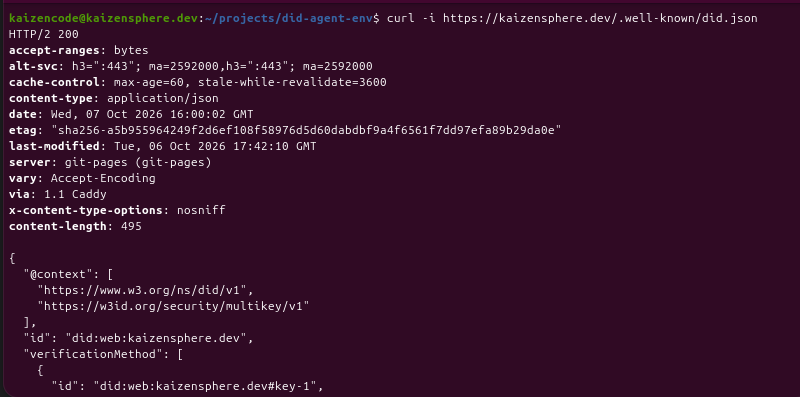
The document answers at its address, served by Codeberg Pages.
The universal resolver confirms the result with the
identifier did:web:kaizensphere.dev.
Isolate the agent
An agent can reach the network in ten different ways, curl, a Python script, a
built-in tool, and each of those requests leaves without any identity. I considered
instructions in its CLAUDE.md file, which it follows in good faith with nothing to
force it; permission rules forbidding curl or wget; and a hook inspecting each
command before it runs. Filtering commands one by one is a never-ending game.
I have got into the habit of isolating my agents in Docker sandboxes, which turns out to be rather helpful, as you will see. I have prepared my environment for you; you will find it in the did-agent-env repository. It describes three containers:
portefeuilleis the credential manager: it holds the agent’s key and signs one proof per request;agentcontains Claude Code and theportefeuillecommand;proxyis the agent’s only way out to the Internet. One could consider adding a check on the headers to block any request without an identity header.
The environment comes down to this:
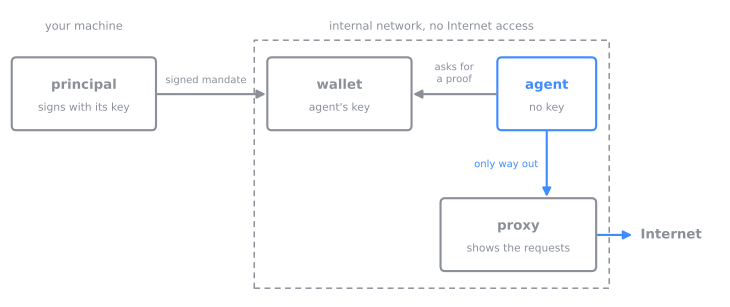
The agent has neither a key nor direct Internet access: it asks the credential manager for its proofs and leaves through the proxy.
Name the agent and start the credential manager
After cloning the did-agent-env repository, edit the template to put in the values that match your setup:
cp env.exemple .env
DID_AGENT=did:web:kaizensphere.dev:agents:redaction
DID_MANDANT=did:web:kaizensphere.dev
Start the credential manager and the proxy. The credential manager generates the agent’s key on its first start:
docker compose up -d --build portefeuille proxy
docker compose logs portefeuille
The log confirms the agent’s identifier and prints its DID document:
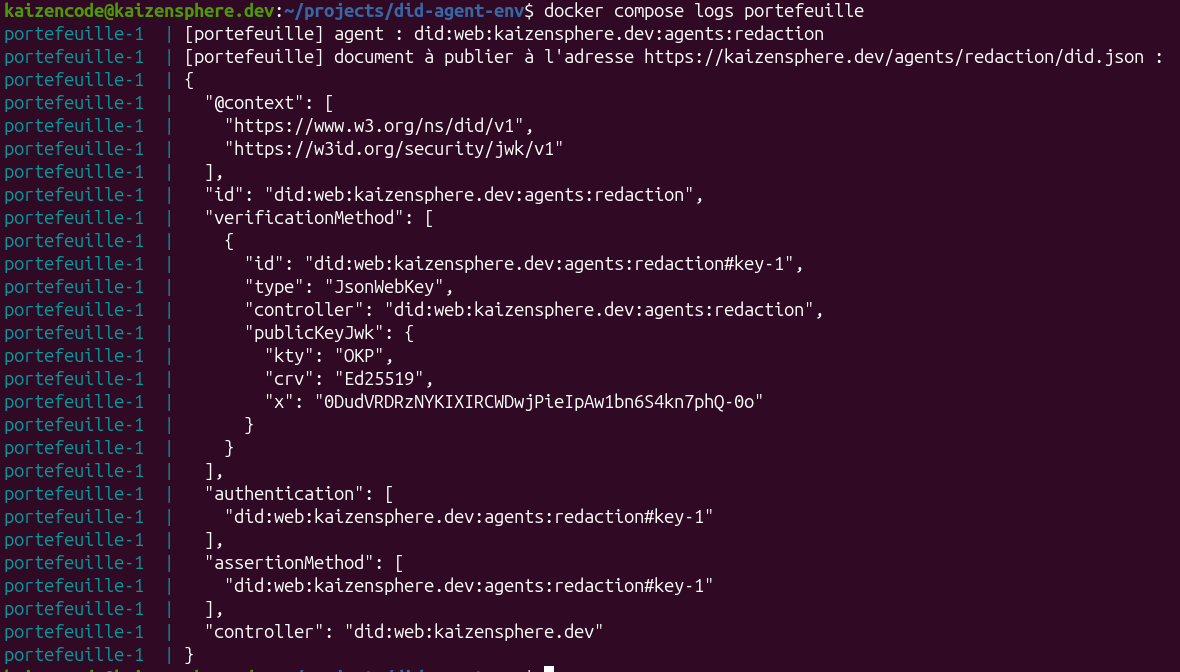
On its first start, the credential manager generates the agent’s key and produces its document.
Publish the agent’s DID document
Create the document’s folder, at the path the agent’s identifier designates:
mkdir -p ~/did/agents/redaction
Ask the credential manager for the document and write it into that folder:
docker compose exec -T portefeuille python /serveur.py document > ~/did/agents/redaction/did.json
This is the document the credential manager prints at start-up, in the capture above.
Publish it in the same place as yours, then check:
curl https://kaizensphere.dev/agents/redaction/did.json
Sign the mandate
The mandate is the credential by which the principal (me) states what the agent is allowed to do, and until when. It is the delegation credential of the previous article: a verifiable credential whose subject is a capability, signed by the principal. The agent attaches it to every request, along with a proof that it holds the key the mandate designates.
Sign the agent’s mandate with your key, on your machine:
cd ~/did-agent-env
./signer-mandat.py --cle ~/.config/did/key.pem \
    --mandant did:web:kaizensphere.dev \
    --agent did:web:kaizensphere.dev:agents:redaction
By default, it allows reading any service for eight hours:
{
  "type": ["VerifiableCredential", "DelegationCredential"],
  "issuer": "did:web:kaizensphere.dev",
  "validUntil": "2026-10-07T02:16:13Z",
  "credentialSubject": {
    "id": "urn:zcap:del_2026_10_06_3c7e70",
    "invoker": "did:web:kaizensphere.dev:agents:redaction",
    "invocationTarget": "*",
    "parentCapability": "*",
    "allowedAction": ["web.read"]
  }
}
The script’s --actions, --heures and --cible options change these values.
To change the mandate itself, its structure is written in
signer-mandat.py,
at the root of the repository.
Start the agent
If you want to see what leaves your agent for the Internet, you can open a terminal:
docker compose logs -f proxy
In another terminal, start the agent:
docker compose run --rm agent
On the first start, log in with your claude.ai account: the agent shows an address to
open in your browser. Then accept the trust prompt for the /travail folder. /travail
is the agent’s working folder inside its container. It is copied from agent/travail
in the repository, where its instructions (CLAUDE.md) and its settings live.
Read its requests in the proxy
Talk to the agent as usual, for instance: “Can you summarise the latest article on codeka.io for me?” (read codeka.io, this blog is great)
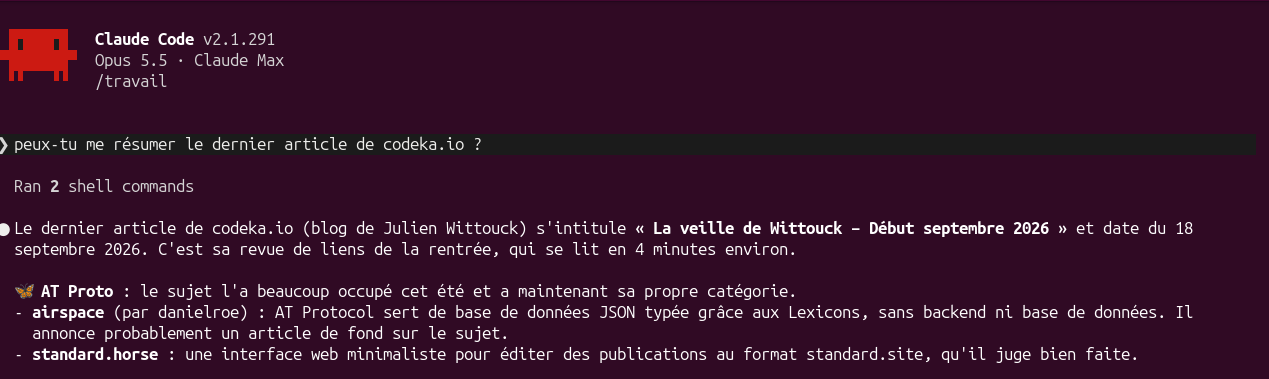
The agent answers as usual. Its two commands went through its credential manager.
Its instructions tell it to go through its credential manager for every network call. The first terminal then shows the requests as they leave:
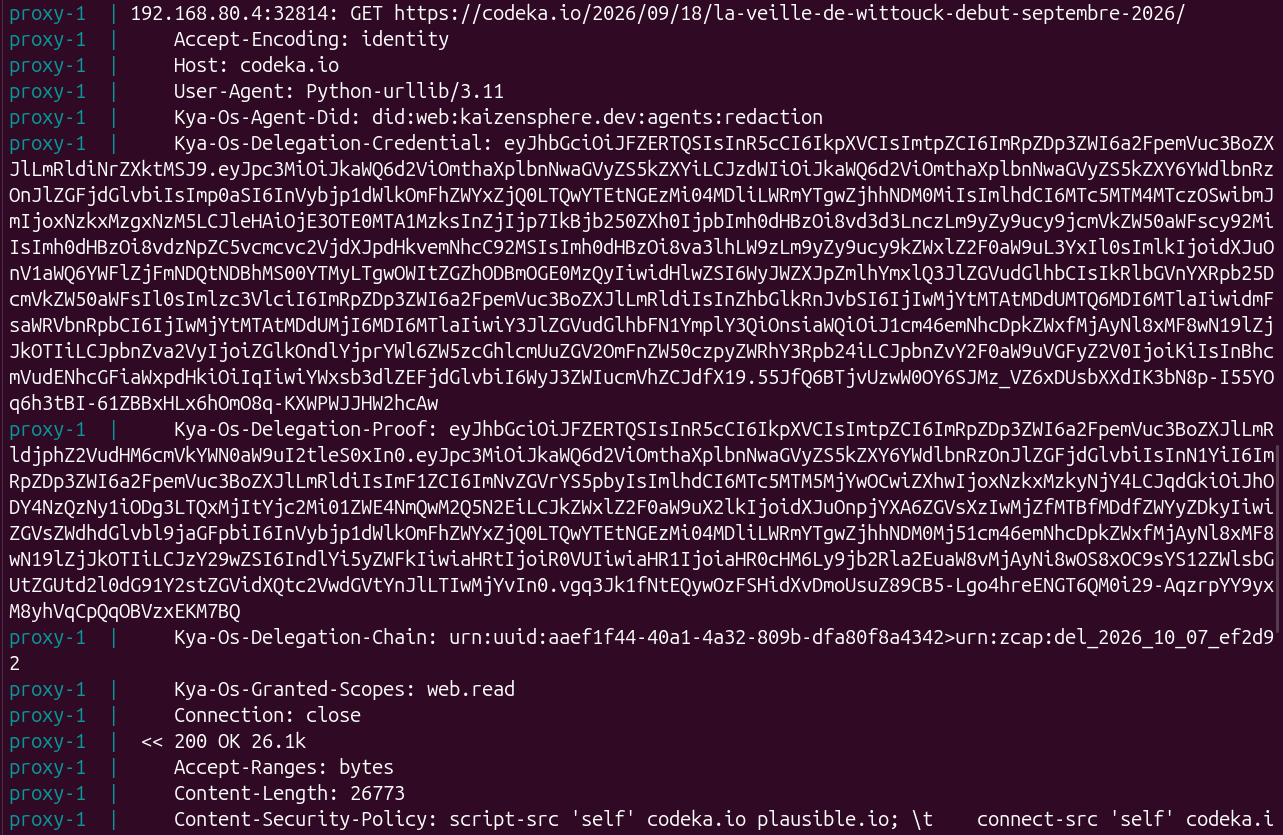
Every request from the agent carries its identity, its mandate and its proof.
The Kya-Os-… headers follow the
KYA-OS
specification. The mandate and the proof are JSON Web Tokens (JWT). Decode the proof,
that is the value of the Kya-Os-Delegation-Proof header:
echo 'eyJ...' | cut -d. -f2 | tr '_-' '/+' | base64 -d 2>/dev/null | jq .
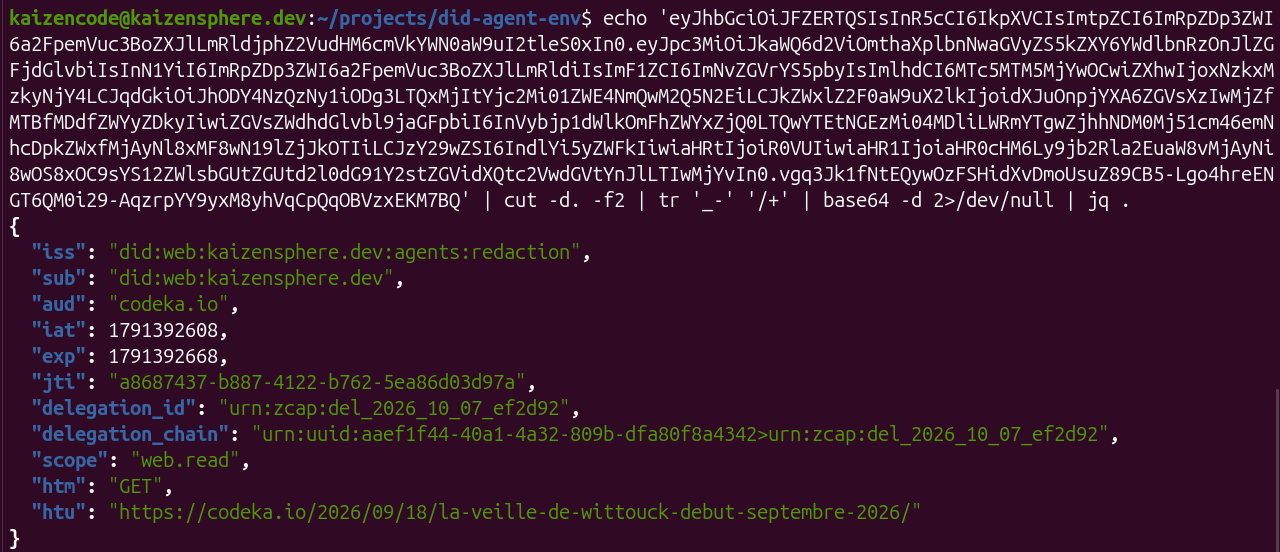
The decoded proof: it names the agent, its principal, the target service and the action, and is valid for sixty seconds.
Then ask for a write: “Send a POST to https://example.com.” The credential manager refuses to sign:
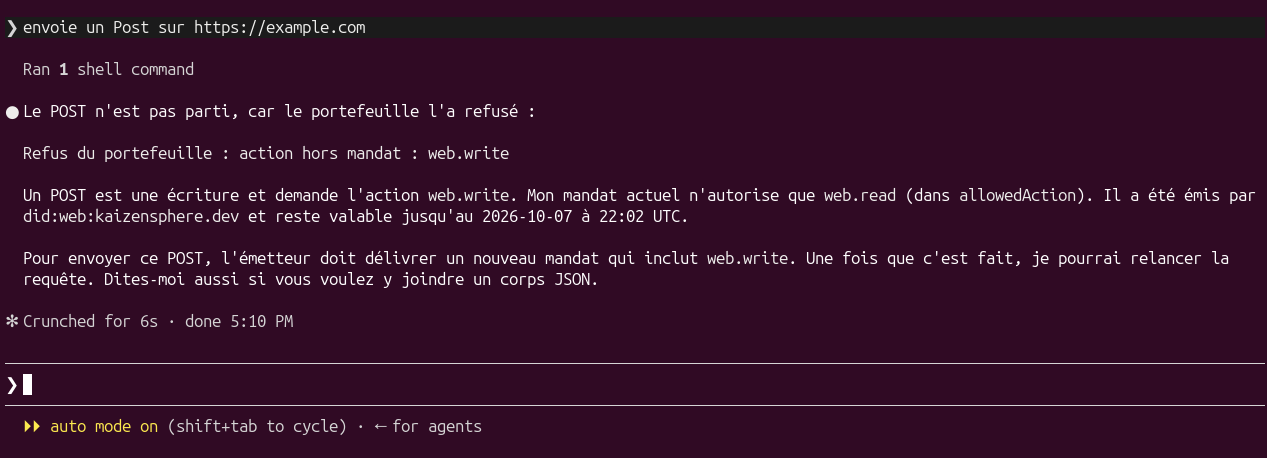
The write is refused by the credential manager: the agent reports the reason and does not work around it.
To stop the environment while keeping the agent’s key:
docker compose --profile agent down
Limits
The limits all stem from the same cause: no service on the other side verifies anything.
Signatures are verified by nobody, and the sites called ignore these headers.
The environment departs from the KYA-OS specification on two points:
- It opens no session. The specification provides for a preliminary handshake, in which
the service verifies the agent and opens a session for it, whose identifier then
accompanies every request in the
KYA-OS-Session-Idheader. As the services perform no verification, no session is created: the agent sends its mandate and its proof with every request, directly. - I added the
htmandhtufields to the proof to make up for the missing session, which would have bound the presentation to the session. They bind the proof to the method and the address of the request. Both names come from DPoP (RFC 9449).